Call Forwarding All Calls for a User - Admin
Last updated: June 25, 2025
You can set up call forwarding to redirect incoming calls to a different user if a user is out of office or away. Please note, this will set ALL incoming calls to that user to be diverted, so once the user is available again you will need to remove this to allow them to receive calls again.
For call forwarding unanswered calls and not ALL calls please refer to this article - https://devyce-knowledge-base.help.usepylon.com/articles/5534651237-setupcallforwardingperuser
You can only set up one forwarding rule per user at a time.
Go to the Call Forwarding tab on the admin portal http://portal.devyce.io/dashboard/call-forwarding
Click the 'Add Forwarding Rule' button on the top right
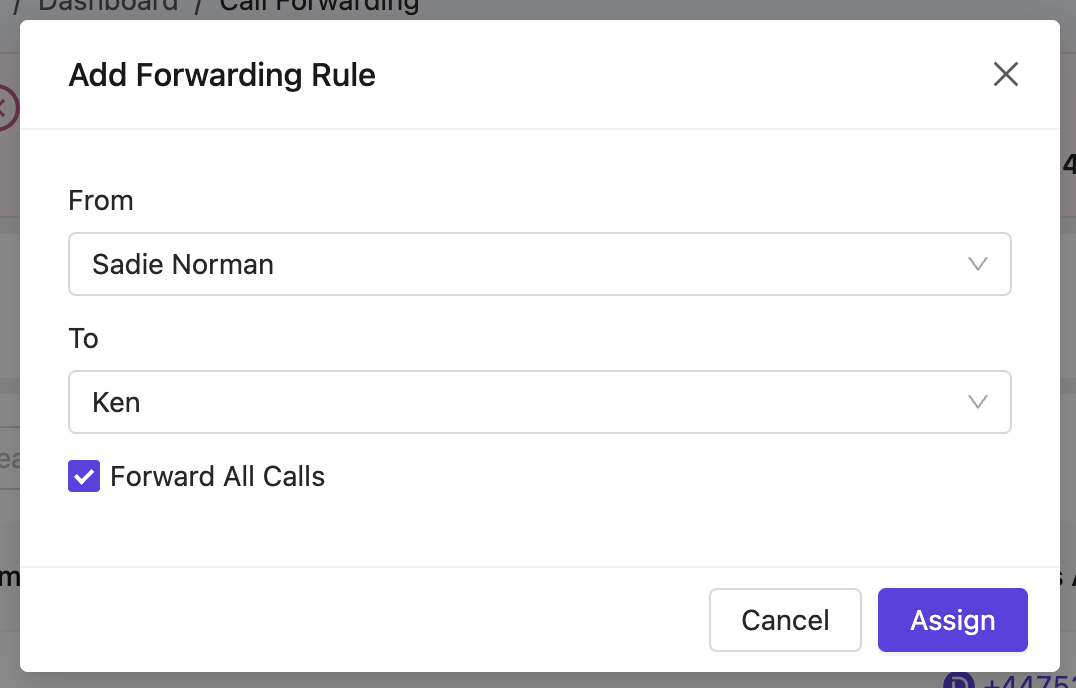
This will bring up a modal where you can configure a new forwarding rule
In the 'From' dropdown, select the user you would like to forward calls from
In the 'To' dropdown, select the user you would like to redirect the calls to
Click the 'Assign' button to create the rule - This will divert ALL calls for this user, so they will no longer receive any inbound calls.
Remember to remove this forwarding rule when it is no longer required
If you are wishing to add call forwarding for when a call is unanswered, this can be done on a user level on their softphone here: https://devyce-knowledge-base.help.usepylon.com/articles/5534651237-setupcallforwardingperuser