Adding Minimal Call Duration to Allow Syncing to your CRM
Last updated: June 25, 2025
Depending on your CRM needs and analytical requirements, unanswered calls can make your call stats look inflated.
To try and remedy this for you, Devyce has created a way where you can dictate a minimum call length before syncing to your CRM.
To add this to your account, you can navigate to your Devyce Portal, and to the Integrations tab https://portal.devyce.io/dashboard/integrations
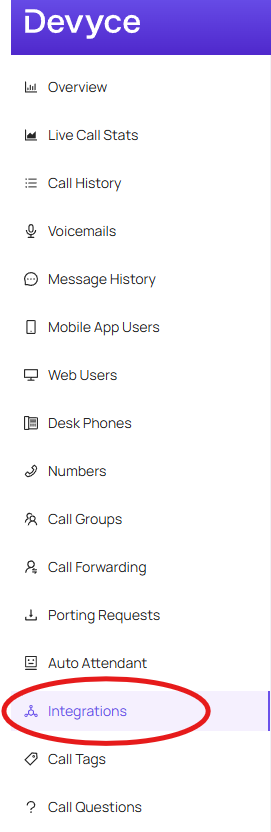
Here you can go to the CRM that relates to your account, and click the configuration button, this will then open additional information including 'Minimum call duration for syncing'
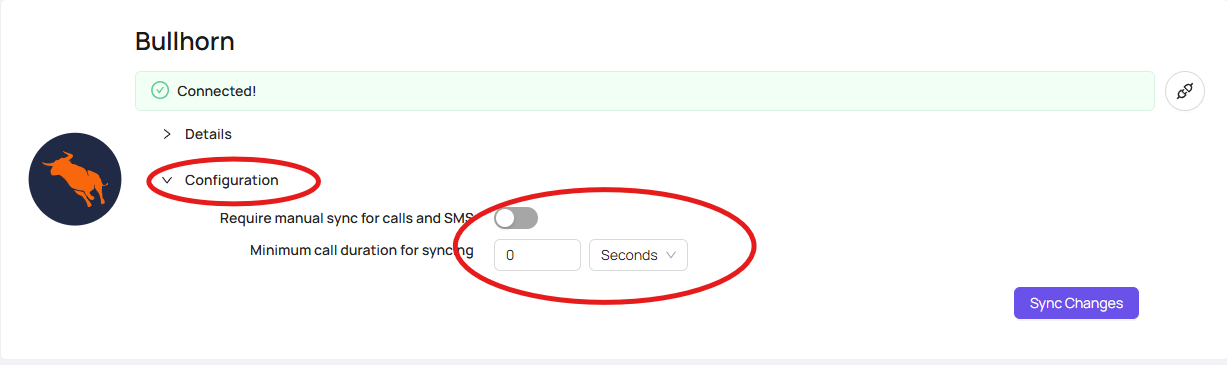
Here you can choose between seconds or minutes, and add the required length of time you would prefer.
This would then mean any calls inbound or outbound that last under the amount you have specified won't be synced to your CRM.