Observer Role
Last updated: July 7, 2026
What is the Observer Role?
The Observer role provides read-only visibility into organisation configuration and user data, without the ability to make changes or intervene in live calls.
It is designed for users who need oversight and transparency - such as leadership, compliance, or operations, without administrative control.
What Observers Can Access
Observers can view data based on the scope they are assigned:
Organisation-Level Access
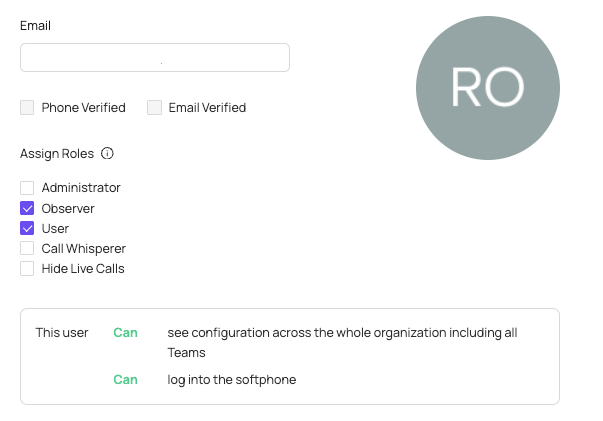
When assigned at the organisation level (this can be set within the Web User section of the portal)
Observers can:
View organization configuration
See user profiles and associated data
Review settings and structure across the entire organization
User Group-Level Access
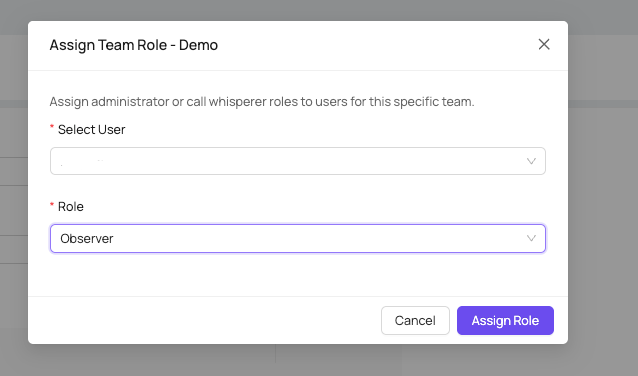
When assigned to a specific user group (via the user group section in the portal), Observers can:
View configuration and user data limited to that group
See performance and activity data for users within scope
What Observers Cannot Do
The Observer role is strictly view-only. Users with this role cannot:
Modify any organisation or user settings
Manage users, permissions, or configurations
Whisper on live calls
Block being whispered on
Take any administrative or coaching actions
This ensures Observers have full visibility without the risk of unintended changes or live-call intervention.
How the Observer Role Compares to Other Roles
Observer vs Admin
While similar to the Admin role in terms of visibility, there are key differences:
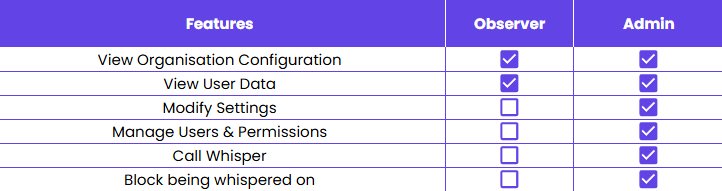
The Observer role is purely observational, whereas Admins have full management and live-call capabilities.
When to Use the Observer Role
The Observer role is ideal for:
Senior leaders who need visibility without hands-on control
Compliance or QA teams
Operations or enablement stakeholders
External auditors or partners (where appropriate)
It allows insight and accountability without introducing risk or operational overhead.
You can find out how to setup the Observer role here