How to Click to Dial using Vincere CRM
Last updated: June 24, 2026
Navigate to https://app.vincere
Hover over your number of choice until the Devyce Chrome Extension pop up is shown.
Click on the number (not the purple extension)
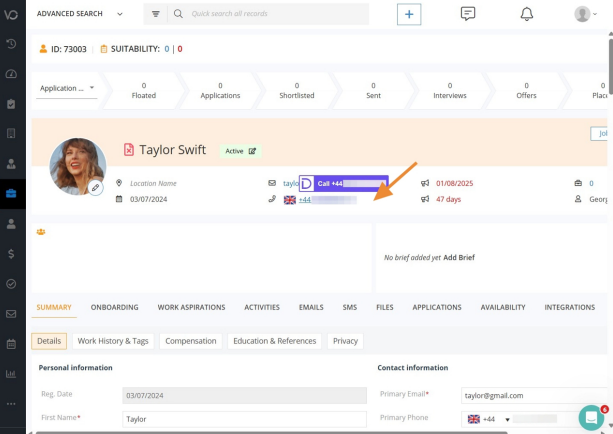
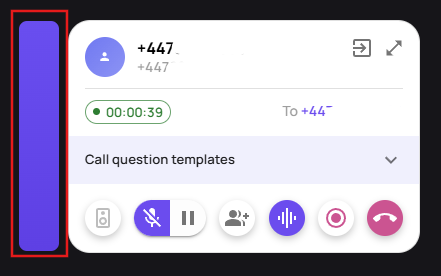
Clicking on the number via the chrome extension will bring up the call modal in the bottom left hand corner. You can move the call modal around the screen by using the purple bar
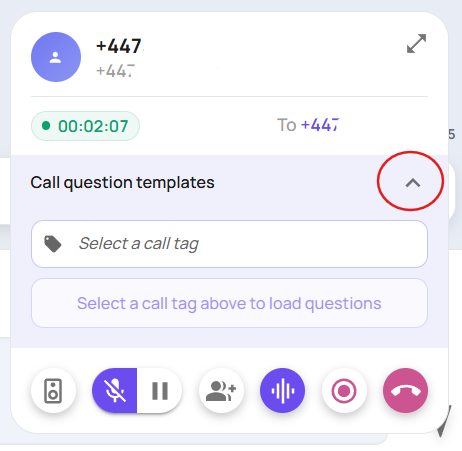
Select a call tag/note action type on the 'call question helper' drop down to expose the call tag option
This will then expose the list of call tags/action notes available to you - you can even scroll through them, if the one you want does not appear straight away.
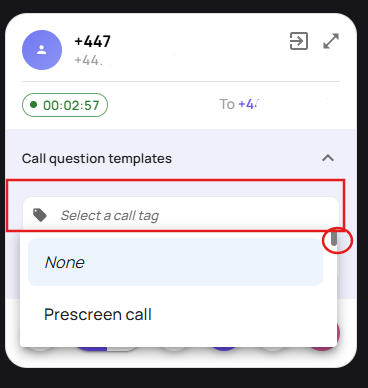
You can then choose your action type/call tag from the drop down, if you have AI Call questions/custom prompts enabled, selecting the corresponding tag will bring up the questions you want the AI to auto fill responses to
If you don't have this feature but would like it, please reach out to customersuccess@devyce.co.uk
Please note depending on your current subscription, this addition may be chargeable.